

Case Summary
Case Study
0
1
•
UX Lead
•
Lytx
•
16 months
•
2026
Lytx AI Chat
Fleet admins at Lytx customers hunted across many Admin screens, or called support, to answer routine questions about their users, devices and vehicles. I led UX for Ask Lytx in Admin, a chat assistant that answers those questions in one conversation, with every number computed from the customer's own account.
The Challenge
Fleet admins managed users, devices and vehicles across many Admin screens. Spotting offline devices, dormant users, duplicates or drivers in the wrong group meant building reports or calling customer success, so routine questions became support tickets. And the bar for an AI answer was high: one wrong count, or one record leaked from another customer, would end trust in the product.
The Solution
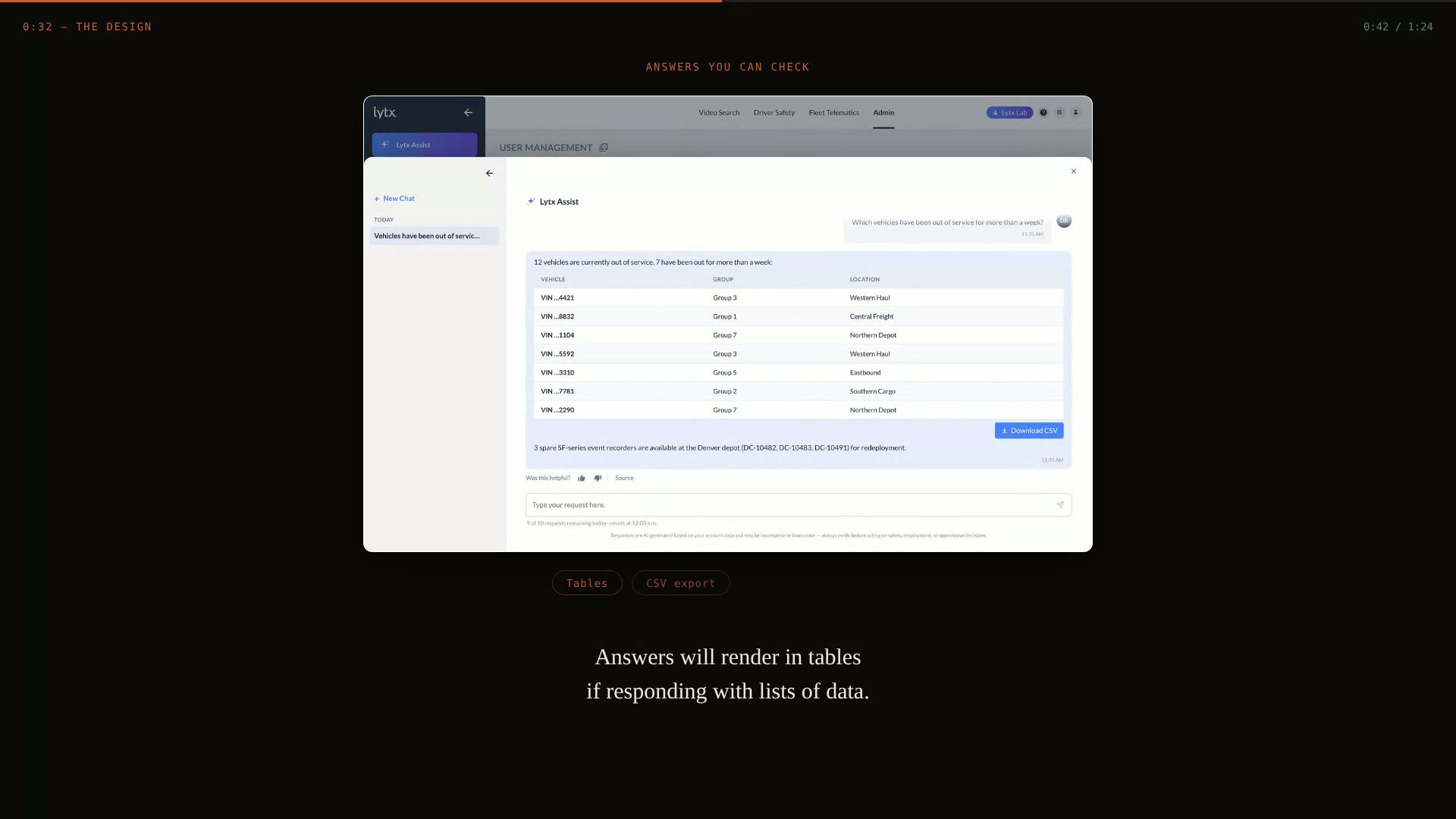
A chat panel in the Admin portal where admins ask questions like "How is my fleet health looking?" and get tables, summaries, suggested follow-ups and CSV exports. Every number comes from Lytx APIs; the model only interprets and formats the results, and guardrails check each request and answer. It is enabled per customer through a feature toggle.
"For an AI admin tool, trust is the feature. If one number is made up, nothing else on the screen matters."
— Daniel Rivas, case study reflection
35
Companies at general availability
37
Active beta users across 19 accounts
~$40
Total model spend during beta
The Process
01
Discovery & Research
Worked from customer success interviews and Lytx's AI policy to map how admins found answers about their fleet, and what an AI answer had to get right to be trusted.
Needs
Get trustworthy answers about their fleet data without building reports or calling support.
Findings
Made-up numbers were the biggest concern for an AI admin tool.
A leaked record from another customer would end trust immediately.
Admins expected the assistant to respect the same roles as the Admin UI.
02
Definition
Ship read-only first: answer questions over live data, and prove accuracy, guardrails and cost with real customers before any write path exists.
Opportunity
Put an assistant inside the Admin portal that answers from live account data, never from the model's imagination, and sees only what the admin can already see in the Admin UI.
Personas
Fleet Admin: full access at the root group; manages users, devices and vehicles.
Customer Success Manager: fields routine requests and drives adoption.
Security and Compliance: requires full auditability and no bypass of roles.
Pain Points
Routine questions became support tickets.
Spotting problems took hand-built reports.
Answers lived across many screens.
03
Design & Prototyping
A chat panel that feels native to the Admin portal: suggested prompts to start, answers as tables with sources and exports, and limits that warn before they block.
Ideation
Suggested prompts from real admin jobs.
Source and feedback on every answer.
Limits that warn before they block.
Prototyping
React prototype built with Claude on the Lytx design system.
UI spec generated from the live build.
04
Delivery
A summer 2026 beta with Users and Devices, Vehicles as a fast follow, then general availability for 35 companies in two passes in September 2026.
Result
Beta reached 37 active users across 19 accounts, who sent 110 queries.
Beta model spend was about $40, far under forecast; prompt caching and routing simple queries to smaller models put the architecture at about a third of a naive build's cost.
Full CSV exports, the top beta fix request, shipped at general availability.
Adoption, return rate, satisfaction and ticket reduction are measured next.
Lessons learned
Read-first sequencing de-risked the launch.
Keeping data out of the model's hands builds trust.
An eval harness is infrastructure, not overhead.
Adoption needs a push: usage dipped after week one and recovered with customer success outreach.
Naming needs an early owner: AI Helper became Lytx Assist, then Ask Lytx.
Selected Screens & Artifacts

Every number comes from Lytx APIs. The model only explains it, with guardrails checking each request on the way in and each answer on the way out.

Counters turn amber before a limit blocks, so admins aren't cut off mid-question.

What the beta and rollout showed, and the next iteration it pointed to.
Tools Used
Daniel Rivas · UX Strategy & Product Design
← Back to home
The Challenge
Fleet admins managed users, devices and vehicles across many Admin screens. Spotting offline devices, dormant users, duplicates or drivers in the wrong group meant building reports or calling customer success, so routine questions became support tickets. And the bar for an AI answer was high: one wrong count, or one record leaked from another customer, would end trust in the product.
The Solution
A chat panel in the Admin portal where admins ask questions like "How is my fleet health looking?" and get tables, summaries, suggested follow-ups and CSV exports. Every number comes from Lytx APIs; the model only interprets and formats the results, and guardrails check each request and answer. It is enabled per customer through a feature toggle.
"For an AI admin tool, trust is the feature. If one number is made up, nothing else on the screen matters."
— Daniel Rivas, case study reflection
Outcomes
35
Companies at general availability
37
Active beta users across 19 accounts
~$40
Total model spend during beta
The process
1
Discovery & Research - Summary
Reviewed customer success discovery on the routine admin questions that drove support tickets.
Mapped how admins found problems across the Users, Devices and Vehicles screens.
Translated the Lytx AI policy (full auditability, no bypass of roles) into design requirements.
Users
Fleet admins with full access at the root group of Lytx enterprise customer accounts.
Needs
Get trustworthy answers about their fleet data without building reports or calling support.
Problems
Answers were spread across many screens, and routine questions became support tickets that kept customers dependent on Lytx for work they could do themselves.
Findings
Made-up numbers were the biggest concern for an AI admin tool.
A leaked record from another customer would end trust immediately.
Admins expected the assistant to respect the same roles as the Admin UI.

2
Definition - Summary
Ship read-only first: answer questions over live data, and prove accuracy, guardrails and cost with real customers before any write path exists.
Opportunity
Put an assistant inside the Admin portal that answers from live account data, never from the model's imagination, and sees only what the admin can already see in the Admin UI.
Personas
Fleet Admin: full access at the root group; manages users, devices and vehicles.
Customer Success Manager: fields routine requests and drives adoption.
Security and Compliance: requires full auditability and no bypass of roles.
Wants/Needs
Code computes, the model explains.
Guardrails at every layer.
Same permissions as the Admin UI.
Measured by eval gates, not guessed.
Pain Points
Routine questions became support tickets.
Spotting problems took hand-built reports.
Answers lived across many screens.

3
Design - Summary
Designed the full 1.0 chat experience: the entry point in the Admin navigation, a panel that keeps the portal in place underneath, welcome and active-chat states, chat history, and the copy and disclaimer that set expectations. The beta ran under the working name Lytx Assist, then was renamed Ask Lytx to match Lytx's unified assistant.
Ideation
Suggested prompts drawn from real admin jobs: device health, dormant users, out-of-service vehicles.
Answers as tables with CSV export, suggested follow-ups, and thumbs up/down feedback with a reason.
A Source button on every answer that explains where the data came from.
Visible limits: character and daily request counters that turn amber before they block, counted on send so they can't be gamed.
Chat history, so admins can return to past answers.
A typing indicator, with input disabled while a request is in flight.
Prototyping
Built the interactive prototype in React with Claude on the Lytx design system.
Generated the UI spec (entry point, panel, states, components, limits, persistence, copy and tone) from the live build.
Kept the prototype as the base for exploring the next iteration.
4
Delivery - Summary
Shipped behind a per-customer feature toggle for full-access admins at the root group. Mid-project, the architecture moved from a custom orchestration layer to managed Bedrock agents, with a supervisor routing to device and user management agents. A 137-case eval suite gated every change on tool selection, parameter accuracy, response quality, guardrails and consistency.
Result
Beta reached 37 active users across 19 accounts, who sent 110 queries.
Beta model spend was about $40, far under forecast; prompt caching and routing simple queries to smaller models put the architecture at about a third of a naive build's cost.
Full CSV exports, the top beta fix request, shipped at general availability.
Adoption, return rate, satisfaction and ticket reduction are measured next.
Lessons Learned
Read-first sequencing de-risked the launch.
Keeping data out of the model's hands builds trust.
An eval harness is infrastructure, not overhead.
Adoption needs a push: usage dipped after week one and recovered with customer success outreach.
Naming needs an early owner: AI Helper became Lytx Assist, then Ask Lytx.
Next Iteration
Beta users' top request was to fix what they found without leaving the chat. The next iteration adds changes to users, vehicles and devices through the same chat, with the admin confirming every write and an audit record behind each one. It is planned, not yet deployed.
