
AI-Native: How I Broke My 2-Decade Design Process

Jul 10
6 min read
Updated: Jul 13
A field report from someone who survived it.
Let me get the obvious part out of the way: yes, this is an article about AI and design. No, it's not going to tell you that AI is "revolutionizing" anything or that you should "lean in" to anything. I've been a product designer for over two decades. I have strong opinions about hype.
What I do have is about six months of actually using Claude as a core part of my workflow — not dabbling, not prompting it to generate UI mockups and calling it a day, but genuinely rebuilding how I work around it. Some of it went well immediately. Some of it took an embarrassingly long time to figure out. Here's the honest version.

Step 1: Questioning Everything I'd Spent 2 Decades Building
This was the uncomfortable part.
When you've refined a process over two decades, it starts to feel less like a process and more like just how things work. But if I'm honest, a lot of what I'd been doing wasn't principled — it was adaptive. I was working around limitations that don't exist anymore.
The question that cracked it open: What am I doing because it requires my judgment, and what am I doing because nobody else was around to do it?
The second list was longer than I expected. Documentation. Status tracking. Handoff overhead. The invisible connective tissue of design work — the stuff that never makes it into a portfolio but quietly consumes half your week.
That's where I started pulling the thread.
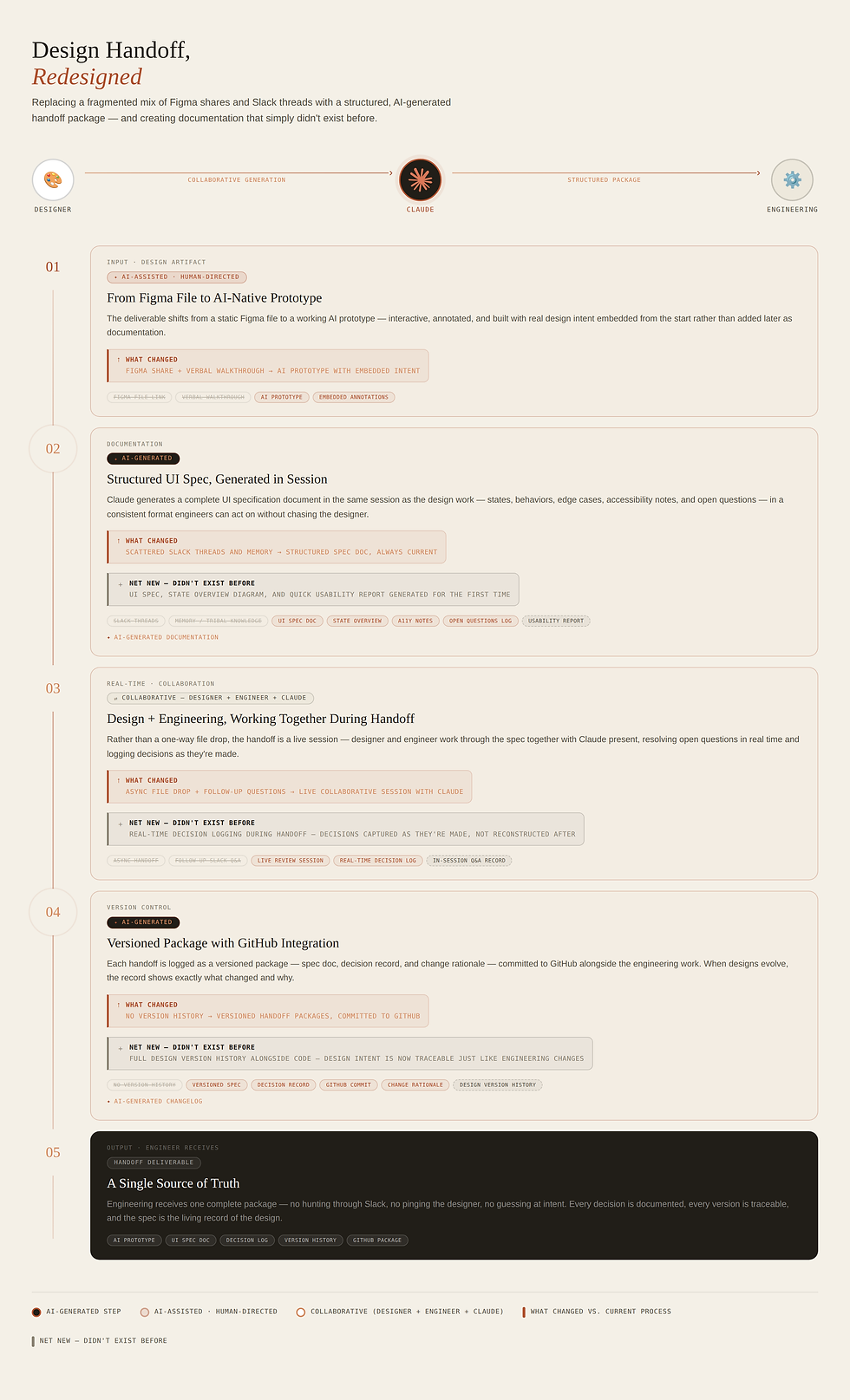
The Documentation That Was Never Going to Write Itself
UI spec documents and State Overview documents are one of design's great shared fictions. Every team knows they should have them. Almost no team actually maintains them. By the time you finish writing the spec, the design has already moved on, and keeping it current starts to feel like painting a bridge — you're done just in time to start over.
So most teams did what mine did: pass everything through Figma comments, Slack threads, and the phrase "just ask the designer." Works great, right up until the designer is in three meetings and nobody can remember why the empty state does that thing it does.
I've changed this by bringing Claude into the documentation loop. The context for what I've designed is in the living prototype (we'll get to that) — the component, the states, the edge cases, the decisions I made and why — and we build the spec together. What comes out is properly structured, consistently formatted, and actually useful to the engineers I'm handing off to.
The State Overviews work the same way. Update a flow, update the doc, same session. It's not magic — it still requires me to think clearly about what I designed. But the part that used to be tedious and therefore never happened? That part is gone.
The side effect I didn't expect: my engineering conversations became noticeably more efficient. Questions that used to require a meeting now have answers before anyone asks them.


Building a Tool for a Job That Doesn't Have a Good Job Description Yet
Here's something happening in product design that people aren't quite talking about directly: the role is quietly absorbing PM responsibilities, and the tooling hasn't caught up.
My day increasingly involves stakeholder alignment, prioritization calls, scope decisions, and keeping track of what was decided and why — work that used to live on the PM side. Except I'm still a designer. The PM tools assume I'm a PM. The design tools assume I'm only designing. I was living in the gap.
So I built a custom guidance and task tracking tool using Claude Design. It holds the context of what I'm working on — product briefs & PRDs, dates and discovery findings, where things stand across multiple workstreams. When I need to think through a prioritization problem or draft stakeholder communication, I'm starting from something that already knows what's going on...and it helps me generate deliverables: briefs, PRDs, user research scripts, stakeholder updates, and beta testing plans.
The mundane version of this is: I offloaded a lot of mental overhead. The less mundane version: I think faster now, because I'm not spending working memory on things I don't need to hold in my head anymore.

Stress-Testing Concepts Before They're Concepts
This took me the longest to figure out, and it's the piece I'm most pleased with.
The classic usability testing problem: by the time you have something polished enough to put in front of users, you've already made a hundred decisions that are expensive to undo. You've picked a mental model, committed to a flow, named things. Testing at that stage is still worth doing, but you're often learning about mistakes you've already embedded into the design.
I wanted to catch problems earlier — at the concept stage, before I've invested weeks in the wrong direction.
What I do now: I design with living prototypes, where I actualize design concepts and test them on the fly. Once I can describe a concept clearly enough — the task flow, the key interaction decisions, my assumptions about how users will think about it — I run a structured evaluation with Claude playing the role of a specific user type. I give it real task context and ask it to find the friction.
To be direct: this is not a replacement for testing with actual humans. Real users will always surprise you in ways no simulation can. But it's a filter. The concepts that survive this early pressure test tend to arrive at human testing in much better shape. And finding a conceptual flaw at this stage costs an afternoon, not a sprint.

A Handoff Tool That Engineers Didn't Hate
The last piece I'll mention is something I built with engineering rather than for them — which, honestly, should be obvious, but designer-to-developer workflows have a long history of being designed unilaterally by one side and resented by the other.
The problem: handoffs were inconsistent, version history was stored entirely in people's memories, and when we needed to revisit a decision — behavior changed, new edge case, the classic "wait, why does it do that?" — there was no record. Just vibes and best guesses.
We built a tool that packages handoffs properly and logs them over time. Each version captures the design intent, the interaction spec, and the open questions still being worked out. When the design evolves, you can see why.
My job in this was generating the documentation — taking my design notes and turning them into structured, consistent handoff packages without creating a bottleneck. The version tracking and workflow were genuinely collaborative.
The engineers will say it changed how they receive design work. I'll say it made me more deliberate as a designer. When your decisions are logged, you make them more carefully.


Comments